Online G-code simulator with 3D toolpath and material removal
Design Swiftly includes a 3D G-code simulator that runs in the browser. It plays back the toolpath of your design, shows the material the bit removes, and lists the G-code line by line, so you can catch mistakes before the machine moves.
Updated by the Design Swiftly team
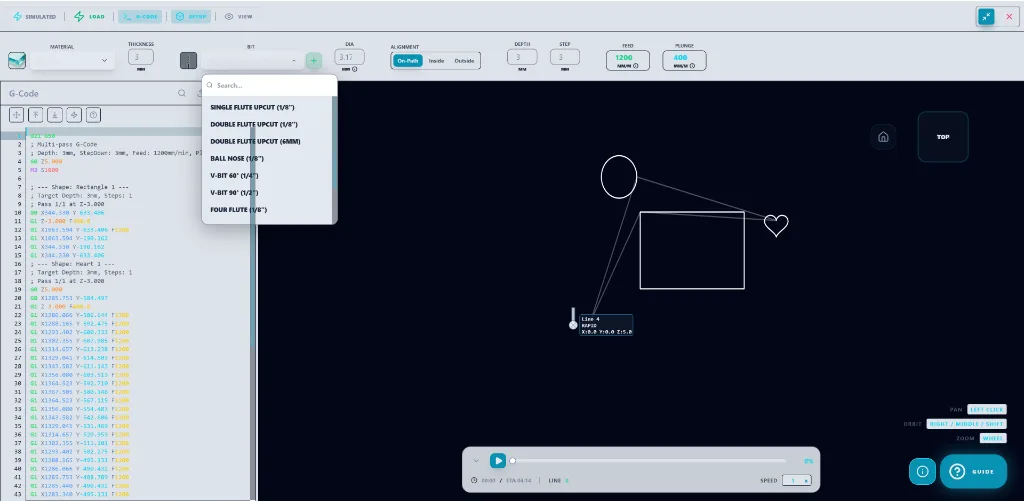
What the simulator shows
- A 3D view of every rapid and cutting move of the toolpath.
- Material removal: the stock is cut away as the playback runs.
- Playback with play, pause and speed control, next to the G-code listing.
- Bit choices include flat, ball nose and V-bits.
- The Free plan allows 5 simulations a day, Pro 20 and Studio unlimited, according to the pricing page.
How to simulate G-code before cutting
- Make the toolpath. Draw or import a design and assign cuts to its paths.
- Open the simulation. Switch to the simulation view to see the toolpath in 3D.
- Play it back. Press play and adjust the speed; pause on any move to read its G-code line.
- Fix and repeat. Change depth, bit or cut type in the editor and run the simulation again.
What to check in a simulation
Look for cuts on the wrong side of a line, pockets that leave islands, depths that go through the stock where they should not, and rapid moves that cross the part at cutting height.
Frequently asked questions
Can I simulate G-code online without installing software?
Yes. The Design Swiftly simulator runs in the browser on desktop and mobile.
Does the simulator show material removal?
Yes. The stock is cut away in the 3D view as the toolpath plays.
Simulate your next cut
Design Swiftly runs in the browser. The Free plan needs no install; see pricing for what Pro and Studio add.
Open Design Swiftly